Phases of the Upgrade Workflow
This page explains the individual phases of an in-place upgrade workflow and how to choose the correct phase for your actor.
Choosing a Phase for an Actor
Here we cover some of the common cases for adding actors to the in-place upgrade process and choosing the right phase for them. For more complicated cases see the overview of each phase in the section below.
Inhibiting the Upgrade of an Incompatible System
This is the case where the system or and application/package has incompatible configuration and the upgrade cannot proceed and has to be inhitibed. For example, the system architecture is incompatible with the new OS version, hardware is incompatible (e.g. not enough RAM), an application would not run on run incorrectly on the target system (e.g. use of old cryptographic algorithms). If the incompatible configuration can be safely modified during the upgrade, see the subsection below instead.
To inhibit the upgrade in such a case, two actors are usually required. One in the FactsCollectionPhase to collect the required information about the system/application and include it in a message. Another in ChecksPhase to actually consume the message and decide if it is compatible and inhibit the upgrade if not.
If the information and checks can only be performed on the target system, e.g. the check is related to the target system repositories, use the analogous phases TargetTransactionFactsCollectionPhase and TargetTransactionCheck.
Modifying Incompatible Configuration during the Upgrade
Three actors are usually required to do this properly. One actor in the FactsCollectionPhase to collect the required information from the system and pass it on in a message. Second actor in ChecksPhase to check whether a modification is needed and in such case producing a report informing the user that the modification will be done during the upgrade. Third actor should reside either in the ApplicationsPhase in case of a vendor provided application or ThirdPartyApplicationsPhase in case of a third party application. This actor should perform the required modification (e.g. modify a configuration file). Note that the application is already upgraded in these phases.
Phases Overview
As every Leapp Workflow, the in-place upgrade workflow consists of several phases outlined in the image below.
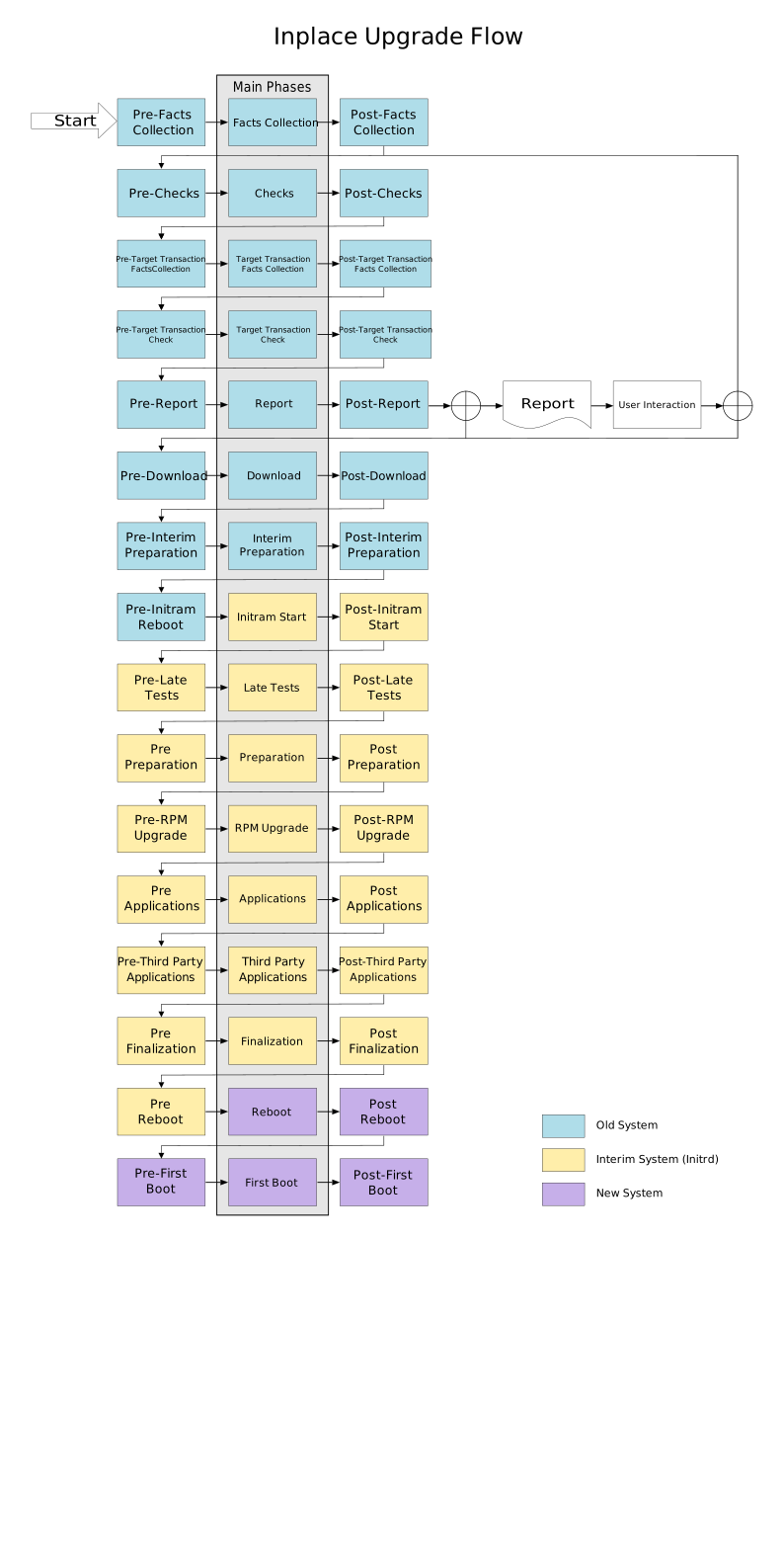
Old System
These are the phases that run on the original (source system) before the first reboot into initramfs. The original system must not be modified during these phases, apart from writing leapp logs/database. If any modification or preparation of the target system is required it needs to be done in the Overlay Filesystem.
FactsCollectionPhase
Actors in this phase scan and collect information from the source system e.g. the mounted filesystem, apps configuration…
No decisions should be done in this phase.
ChecksPhase
In this phase the source system configuration and packages/applications are checked for compatibility and viability of the upgrade. For example, the partition/filesystem layout, application configuration files, network configuration, etc. If an incompatibility or potential risk is detected, a report should be created to inform the user and potentially inhibit the upgrade.
Note that that any information required for the checks from the system has to be obtained by an Actor in the previous phase (FactsCollectionPhase) and passed as a message.
TargetTransactionFactsCollectionPhase
This phase is analogous to the FactsCollectionPhase for the target system.
Here the information about what repositories are available on target system, what is expected calculation of target transaction (what will be installed, removed, …) is collected. This is also the place where target userspace is created by Target userspace creator.
TargetTransactionCheck
Checks upgradability regarding the information gathered about the target system. Such as whether expected repositories and RPMs are available, what RPMs are planned to install, remove, …
IOW, checks related to RPM transaction mainly.
ReportsPhase
This is a dummy phase not containing any actors (see Working with workflows. Reports are presented to the user during this phase. This is also the final phase if leapp is run using leapp preupgrade.
DownloadPhase
Download the RPM packages and perform the RPM transaction test to determine the success of the packages upgrade using the Leapp DNF plugin.
InterimPreparationPhase
Prepare the upgrade initramfs (initial RAM file system) and setup bootloader - mainly the upgrade boot entry.
This is the last phase ran in the source system - user is prompted to review the reports and reboot. The upgrade continues after the reboot.
Interim System
This is the part of the upgrade process executed in the “interim system” - the upgrade initrams after the reboot after the previous phase.
InitRamStartPhase
Leapp dracut modules and upgrade initramfs. Removes the upgrade bootloader and (on some system configurations UEFI) entry.
LateTestsPhase
Run last tests before the RPM upgrade that have to be done with the new target system kernel and systemd.
PreparationPhase
Runs various preparations and cleanup before the RPM upgrade transaction.
RPMUpgradePhase
The actual upgrade RPM transaction is performed in this phase using the Leapp DNF plugin, i.e. the RMPs are upgraded. Some additional actors are run depending on the system configuration. Leftover packages are reported.
ApplicationsPhase
The necessary steps to finish upgrade of applications provided by Red Hat are performed.
This may include moving/renaming of configuration files, modifying configuration of applications to be able to run correctly and with as similar behaviour to the original as possible.
ThirdPartyApplicationsPhase
Analogous to the Applications phase, but for third party and custom applications.
This is where custom actors can be put to modify the configuration of the upgraded third party packages.
FinalizationPhase
This is the last phase ran in the interim system. The system restarts after a reboot.
Additional actions that should be done before rebooting into the upgraded system are done during this phase.
This includes, for example, SELinux relabeling, generation of target initramfs, enabling/disabling systemd services.
Also, a leapp_resume.service systemd service is created to resume leapp after the reboot into target system.
Target System
The interim system reboots into the upgraded (target) system containing only one phase.
FirstBootPhase
Last phase of the upgrade process. Final modifications required to be done on the target system are executed.